List and Remove Running Apps
Q
How to list and remove running apps?
✍: FYIcenter.com
A
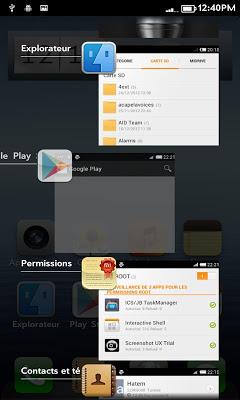
 You list the running apps on Samsung tablets, you can:
Press and hold "Home" button.
You see a list of running apps displayed.
You list the running apps on Samsung tablets, you can:
Press and hold "Home" button.
You see a list of running apps displayed.
To resume a running app from the list: Tap it.
To remove a running app from the list: Swipe it to left or right.
2026-07-30, ∼1986🔥, 0💬
Related Topics:


