Identify Purchaser of Media File in iTunes
How to Identify Purchaser of a Media File in iTunes?
✍: FYIcenter.com
 All media files (Music, Movies, TV Shows, Books, Audiobooks, Tones)
you downloaded (paid or free) from App Store or iTunes store
are tagged with your Apple ID as the "Purchaser".
All media files (Music, Movies, TV Shows, Books, Audiobooks, Tones)
you downloaded (paid or free) from App Store or iTunes store
are tagged with your Apple ID as the "Purchaser".
You can view "Purchaser" using "(file) Info > File" context menu (right-click on file name). Purchaser's Apple ID is listed in the "purchased by" field.

The "Purchaser" tag allows Apple to enforce copyright laws when you try to modify any media files or transfer them to other devices. Here are 2 basic rules used in Apple's enforcement:
1. When you try to modify, even delete, a purchased file on an Apple device, and the "Purchaser" of the file is not the same Apple ID of the device, you will be prompted to enter the Apple ID and password of the "Purchaser".
This happens in the following scenarios:
- You give your old iPad to your friend to use and forget to remove all media files you have downloaded. Your friend will be prompted to enter your Apple ID and password. when modify a media file.
- You have two Apple IDs and switched the Apple ID on your iPad. You will be prompted to enter your other Apple ID and password, when modify a media file.
- You signed out your Apple ID on your iPad. You will be prompted to enter your Apple ID and password, when modify a media file.
2. A media file is not allowed to be transferred to a device that signed in with a different Apple ID than the file's "Purchaser".
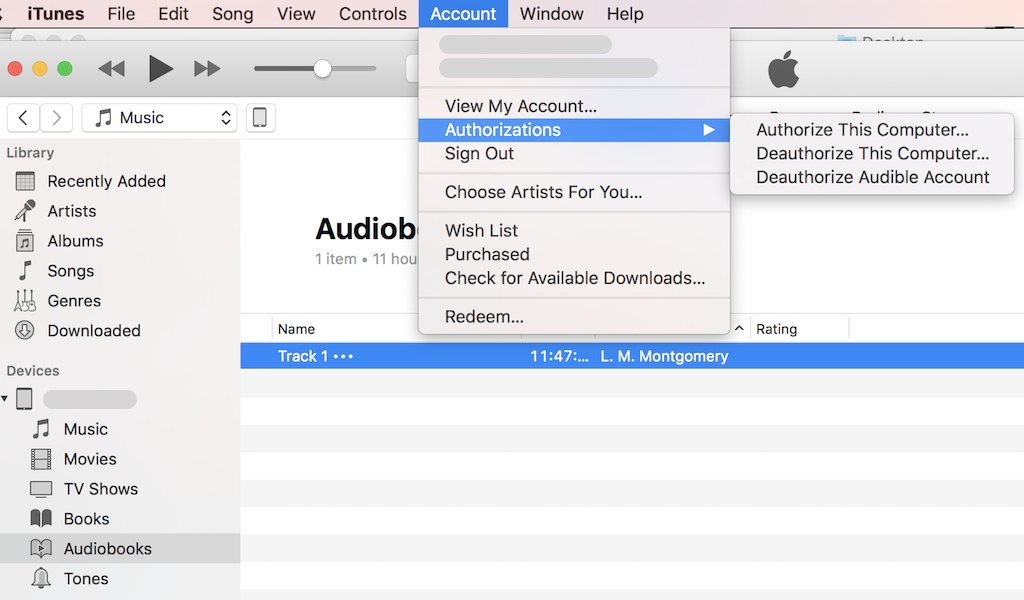
For example, if the iTunes on your PC is signed in with a different Apple ID than your iPad, you will not be able to transfer (or sync) a movie file from iPad to iTune. you have to authorize iTune with the same Apple ID as the "Purchaser" of the movie file using the "Account > Authorizations" menu.
⇒ Apple iPad - Frequently Asked Questions
2025-09-16, ∼1829🔥, 0💬
Related Topics:


