iOS 9 to 12 Upgrade on iPad over iTunes
How to perform iOS upgrade on my iPad through iTunes on a remote PC?
✍: FYIcenter.com
 You can follow these steps to
perform iOS upgrade on your iPad
through iTunes on a remote PC.
You can follow these steps to
perform iOS upgrade on your iPad
through iTunes on a remote PC.
1. Start iTunes on your PC.
2. Connect your iPad to your PC (running macOS or Windows) with a USB cable.
3. Give permission to allow iTunes on your PC to control your iPad. You should see the permission prompts on both PC and iPad.
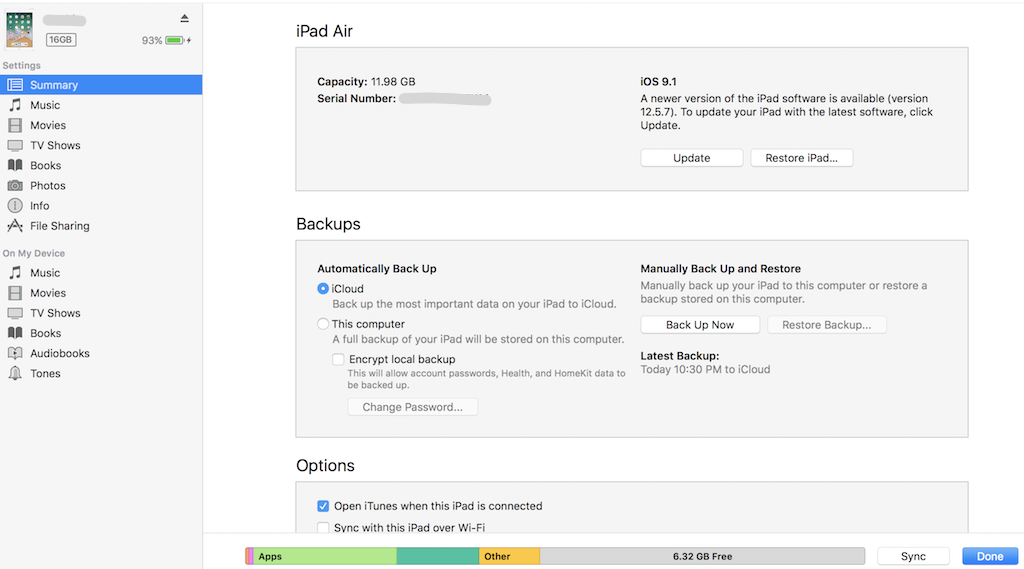
4. Click the device icon representing the connected iPad. You see the device summary displayed:
iPad Air

iOS 9.1
A newer version of the iPad software is available (version 12.5.7).
To update your iPad with the latest software, click Update.
[Update] [Restore iPad...]
4. Click "Update". iTunes starts to download iOS 12.5.7 package, exact the package, and push it to iPad.
5. Click "Update". iTunes starts to download iOS 12.5.7 package, exact the package, push it to iPad, and restart iPad to install iOS 12.5.7.
6. Wait for about 10 minutes, iPad restarts with new iOS and begins the setup process.
7. Follow instructions on iPad to finish the setup process. On the Apple ID and password step, you can tap "Skip This Step", if it fails to validate your password. You can provide Apple ID and password in Settings after the setup process.
8. Go to "Settings" to review new iOS settings. You should see "Settings > Search 'Version'": 12.5.7.
⇒ Apple ID Out of Sync after iOS Upgrade
2025-10-14, ∼8023🔥, 0💬
Related Topics:

