Measure Heart Rate with M3 Smart Bracelet
How to measure heart rate with my M3 Smart Bracelet?
✍: FYIcenter.com
 If you want to measure your heart rate and blood pressure with your M3 Smart Bracelet,
you need to follow these steps.
If you want to measure your heart rate and blood pressure with your M3 Smart Bracelet,
you need to follow these steps.
1. Wear the M3 Smart Bracelet on your arm.
2. Tap on the function button to turn on the screen.
3. Tap on the function button repeatedly until you see the "Heart rate" function screen.

4. Touch and hold the function button to start the measurement. You will see green light blinking on the back of the Bracelet.

5. Wait for the measurement to finish. You will see the result:
BPM: 75 (heart rate - beats per minute)
(Blood pressure): 99/68 mmHg (millimeters of mercury)
(Blood oxygen level): 95% SpO2 (oxygen saturation)
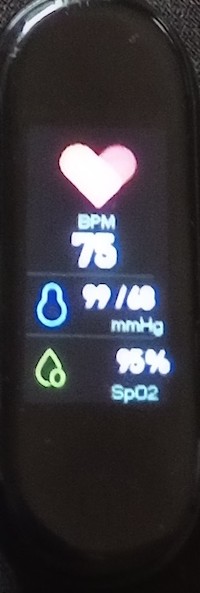
Note that if you are not wear the bracelet properly, the measurement result may not be accurate.
⇒ Sport Tracking with M3 Smart Bracelet
2024-11-14, ∼1914🔥, 0💬
Related Topics:
