Export Photos out of Library on macOS
How to export photos and videos out of the library on my macOS computer? I want to save them as separate files.
✍: FYIcenter.com
 You can leave your photos and videos forever in the Photos library on your macOS computer.
But if you want to create a copy of some photos and export them out of the library as separate files,
you can follow this tutorial.
You can leave your photos and videos forever in the Photos library on your macOS computer.
But if you want to create a copy of some photos and export them out of the library as separate files,
you can follow this tutorial.
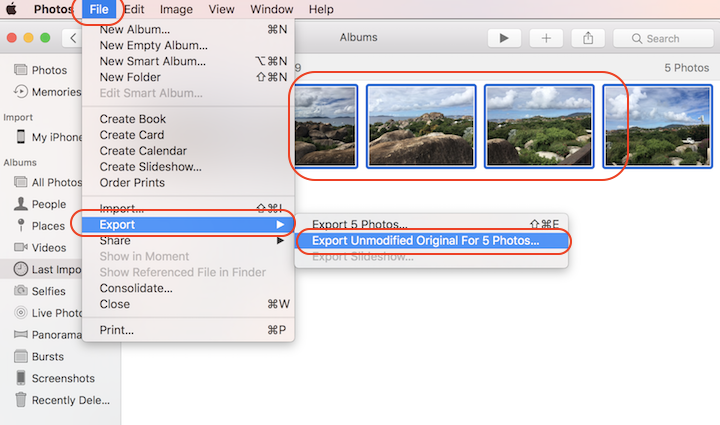
1. Select the photos you want to export.
2. Click "File > Export > Export Unmodified Original for # Photos..." menu. You see a file location selection dialog box.
3. Select a location where you want to store the exported photos. And click "Export" to finish.
You can also export the modified version of photos, if you have edited any of them.
2023-04-06, ∼2179🔥, 0💬
Related Topics:


