iPhone Buttons/Switches and Meanings
Q
What do those buttons and switches mean on my iPhone?
✍: FYIcenter.com
A
 Your iPhone has several buttons and switches located at different
places on your iPhone.
Your iPhone has several buttons and switches located at different
places on your iPhone.
Home/Touch ID Button - Located at the bottom center of the screen and allowing you to:
- Press once to wake up the iPhone.
- Press once to see the passcode screen to unlock the iPhone.
- Press once to get out of an app and go back to Home screen.
- Press twice to see App Switcher.
- Touch and hold to unlock the iPhone with your fingerprint.
- Press it together with the power button to take screenshot.
Power Button (also called Sleep/Wake button, or Side button, or Top button) - Located on the top side or on the right side and allowing you to:
- Press once to wake up the iPhone.
- Press once to put the iPhone to sleep.
- Press and hold to power off the iPhone.
- Press and hold to power off the iPhone.
- Press it together with the home button to take screenshot.
Ring/Silent Button - Located on the left side and allowing you to:
- Switch down (showing orange color inside) to put your iPhone in silent mode. All incoming calls and alerts will vibrate instead of ring, except for calls from "Favorite" contacts and alarms.
- Switch up (showing no color inside) to put your iPhone back in normal mode.
Volume Up Button - Located on the left side and allowing you to:
- Press once to bring the speaker's volume up by 1 scale.
- Press once to release camera shutter to take a picture.
Volume Down Button - Located on the left side and allowing you to:
- Press once to bring the speaker's volume down by 1 scale.
- Press once to release camera shutter to take a picture.
The picture below shows you locations of iPhone buttons and switches:
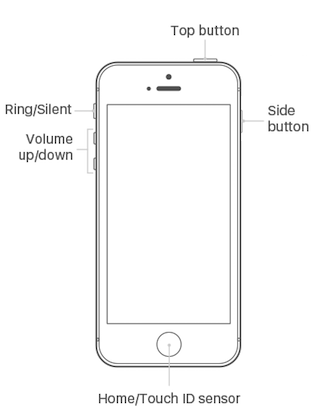
2021-04-15, ∼4796🔥, 0💬
Related Topics:


