Replace (Sync) Music Files from iTunes to iPhone
How to replace (one-way sync) music files on iPhone with iTunes library on Mac?
✍: FYIcenter.com
 Because of digital copyright restrictions, iTunes does not allow you to freely
transfer music files between iPhone Music and iTunes library on your Mac.
Because of digital copyright restrictions, iTunes does not allow you to freely
transfer music files between iPhone Music and iTunes library on your Mac.
You can only replace (one-way sync) all music files on your iPhone Music with music files in iTunes library on your Mac as shown in this tutorial. Warning, all existing downloaded music files in your iPhone Music will be removed!
1. Run iTunes on your Mac computer.
2. Connect your iPhone to the computer with a USB cable. You see a phone icon showing up.
3. Click on the phone icon. You see the phone device management windows.
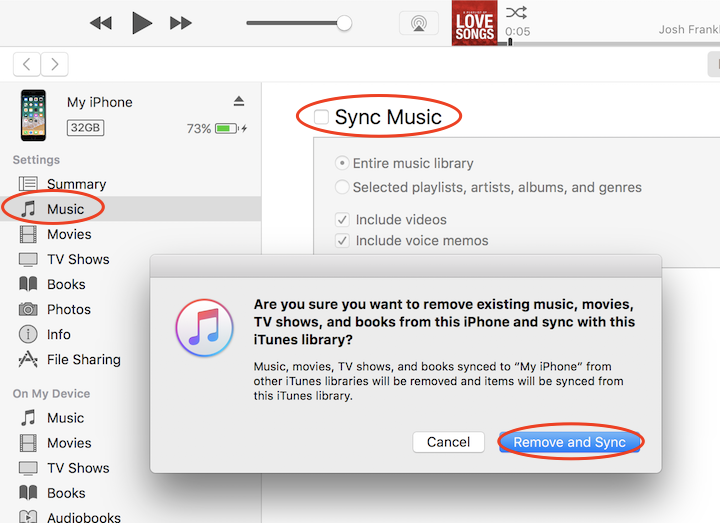
4. Click on "Music" under "Settings" on the left. You see the "Sync Music" screen.
5. Click "Sync Music" checkbox. You see a warning message:
Are you sure you want to remove existing music, movies, TV shows,
and books from this iPhone and sync with this iTunes library?

Music, movies, TV shows, and books synced to "My iPhone" from
other iTunes libraries will be removed and items will be synced
from this iTunes library.
6. Click "Remove and Sync", if you are sure.
7. Wait for the sync process to finish.
The Music library on your iPhone will be identical to the iTunes library on Mac now.
Pictures/videos in Photos and items in Files on your iPhone will not be touched.
⇒ iTunes Media Folder Settings on Mac
⇐ Copy Music File Out from iPhone Music to Mac
2020-09-07, ∼4644🔥, 0💬
Related Topics:

