Categories:
Android (32)
Apple (iPhone) (829)
Apps (26)
BlackBerry (3)
General (438)
HTC (6)
Huawei (83)
LG (43)
Motorola (50)
Nokia (4)
Palm (10)
Samsung (163)
Sony (1)
Technology (17)
Windows Phone (209)
ZTE (5)
Online Tools:
Tutorial Collections:
Other Resources:
Add Music Files to iTunes Library on Mac
How to add a single music file to iTunes music library on Mac?
✍: FYIcenter.com
You can follow this tutorial to add a single music file to
iTunes music library.
1. Start iTunes on your Mac computer.
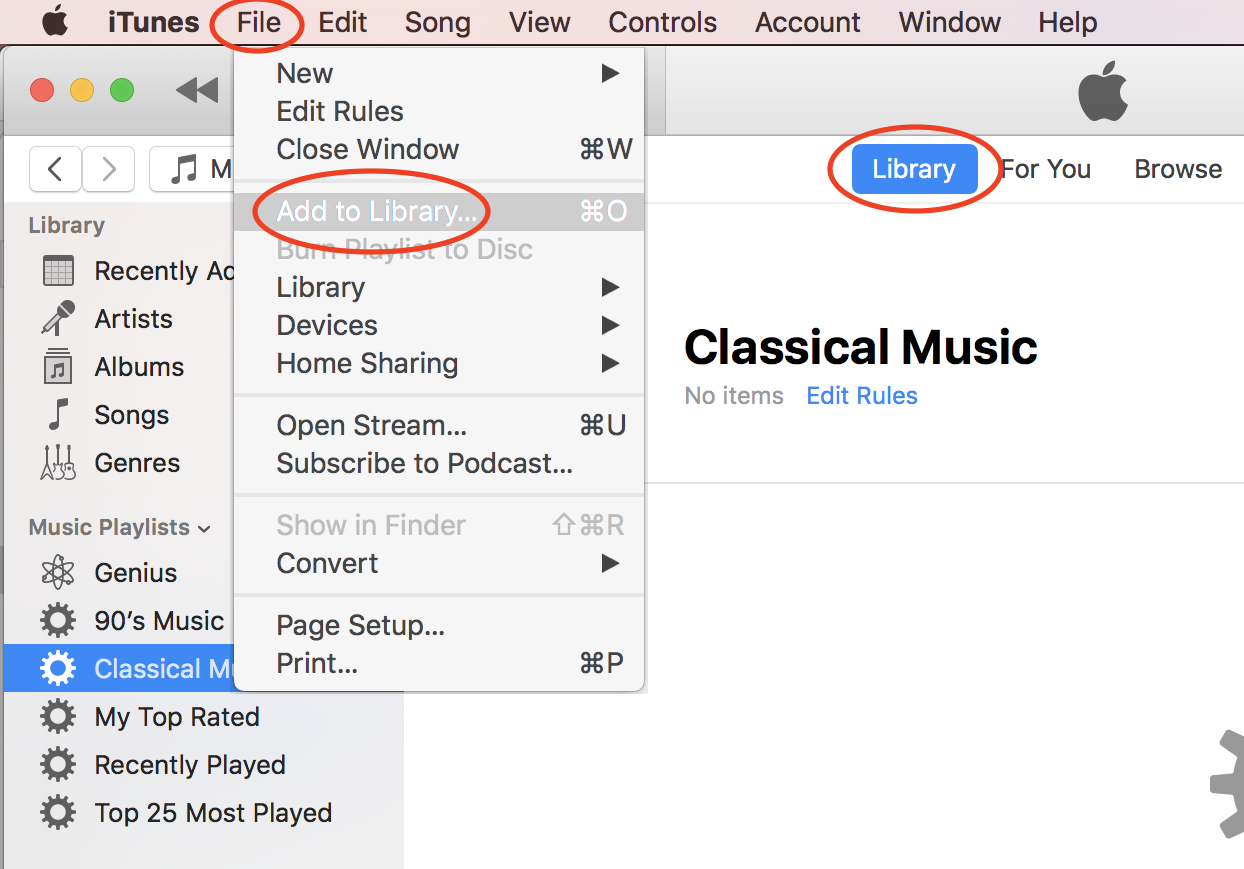
2. Click "File > Add to Library..." in the menu. You see a file browser displayed.
3. Browse the hard disk of your computer to locate the music file.
4. Select the music file and click "Open". The selected file will be added to iTune music library.
⇒ Add Music Folder to iTunes Library on Mac
⇐ Downloaded Free Music from Amazon
2020-10-20, ∼2135🔥, 0💬
Popular Posts:
What is the SIM card? And what is the SIM number? A SIM (Subscriber Identity Module) card is an inte...
iPhone - Audio- What format are voice memo files on the iPhone? The Voice Memos app on iOS devices i...
Where to find answers to frequently asked questions about SIM (Subscriber Identity Module) Card? Her...
What does CMIIT stand for? And what does the CMIIT ID # mean on my phone? CMIIT stands for China Min...
When was HTC One phone first released? How does HTC One phone look like? What are the main technical...