Categories:
Android (32)
Apple (iPhone) (829)
Apps (26)
BlackBerry (3)
General (438)
HTC (6)
Huawei (83)
LG (43)
Motorola (50)
Nokia (4)
Palm (10)
Samsung (139)
Sony (1)
Technology (17)
Windows Phone (209)
ZTE (5)
Online Tools:
Tutorial Collections:
Other Resources:
Add Music Files to iTunes Library on Mac
How to add a single music file to iTunes music library on Mac?
✍: FYIcenter.com
You can follow this tutorial to add a single music file to
iTunes music library.
1. Start iTunes on your Mac computer.
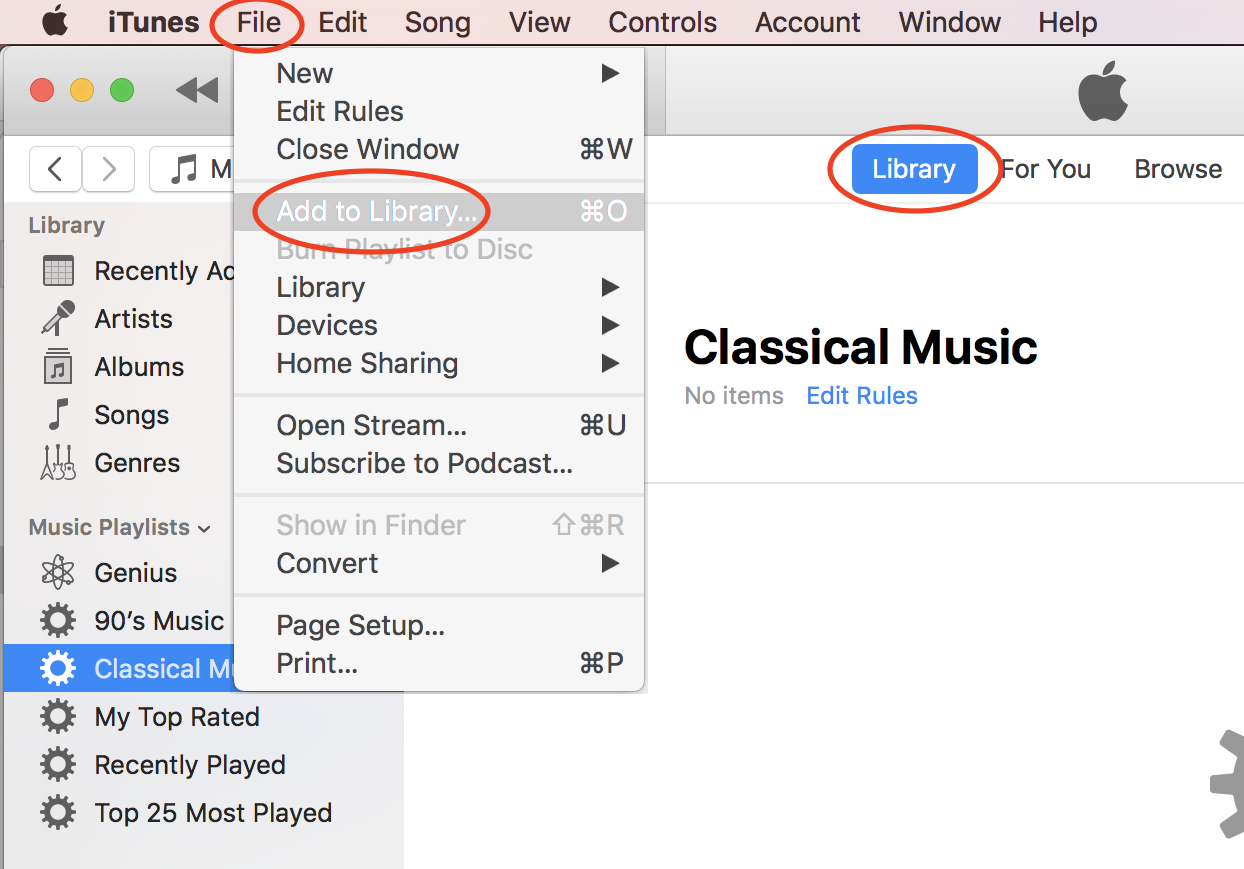
2. Click "File > Add to Library..." in the menu. You see a file browser displayed.
3. Browse the hard disk of your computer to locate the music file.
4. Select the music file and click "Open". The selected file will be added to iTune music library.
⇒ Add Music Folder to iTunes Library on Mac
⇐ Downloaded Free Music from Amazon
2020-10-20, ∼1835🔥, 0💬
Popular Posts:
When was Samsung Galaxy Note II phone first released? How does Samsung Galaxy Note II phone look lik...
How wireless technologies evolve from from 1G to 4G? The 1G (1st Generation) of wireless technologie...
Where to find answers to frequently asked questions about Android Operating System? Here is a list o...
What are background services created by Google Gboard? Can I stop them to improve performance of my ...