Sync Books in iTunes with iPhone on Windows
How to sync books to iTunes local library with iPhone iTunes library on Windows?
✍: FYIcenter.com
 You can follow this tutorial to sync books to iTunes local library with iPhone iTunes library.
1. Run iTunes and connect your iPhone to the computer with a USB cable. You see a phone icon showing up.
2. Click on the phone icon. You see the phone device management windows.
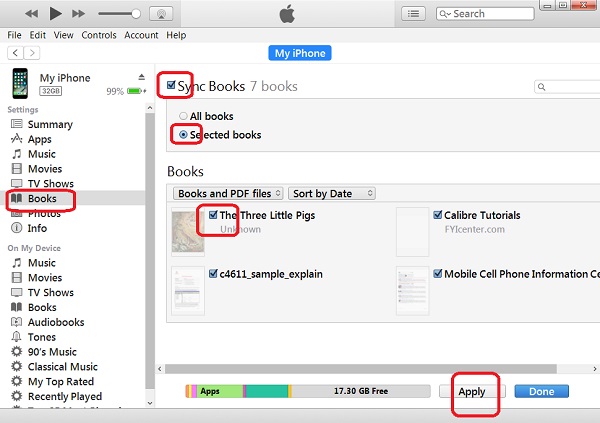
3. Click "Books" under "Settings" on the left. You see the local book library.
4. Click to select books that you want to be synced with your iPhone.
5. Click "Sync Books" to turn it on.
6. Click the "Selected books" radio button.
7. Click "Apply" near the bottom of the screen. All selected books will be synchronized with iPhone iTunes library.
Warning: Any books that are not in the selected list and not purchased from Apple book stored will be removed from your iPhone.
The picture below shows you how to sync books to iTunes local library with iPhone iTunes library:
⇒ iTunes Sync Error on Windows: Book not Found
⇐ Add Books to iTunes Local Library on Windows
2021-01-09, ∼2445🔥, 0💬
Related Topics:

