iTunes Video Playback Not Supported on Windows
Q
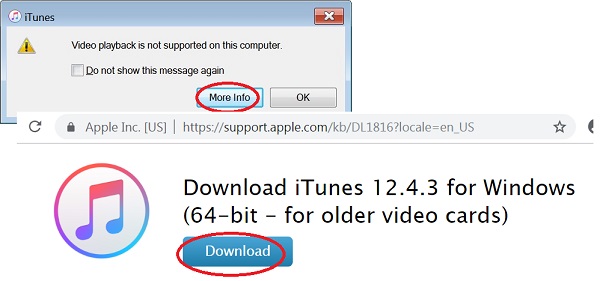
Why am I getting the "Video playback is not supported on this computer" when I start iTunes on Windows?
✍: FYIcenter.com
A
 If you have an older computer with a low end video card,
iTunes will give this error message:
If you have an older computer with a low end video card,
iTunes will give this error message:
Video playback is not supported on this computer.
            [ More Info ]  [ OK ]
Click "More Info", an Apple Website is displayed to suggest you to download and install an older version: iTunes 12.4.3 for Windows (64-bit for older video cards).
Un-install the current version of iTunes on computer.
Then click "Download" to download and install iTunes 12.4.3.
⇒ Check for iTunes Updates on Windows
⇐ Start iTunes for Windows First Time
2020-12-22, ∼4849🔥, 0💬
Related Topics:
