Download and Install iTunes for Windows
How to Download and Install iTunes for Windows?
✍: FYIcenter.com
 If you are Windows computer user and have an iPhone or iPad, you should follow this tutorial
to download and install iTunes for Windows.
If you are Windows computer user and have an iPhone or iPad, you should follow this tutorial
to download and install iTunes for Windows.
1. Make sure your Windows computer is connected to the Internet.
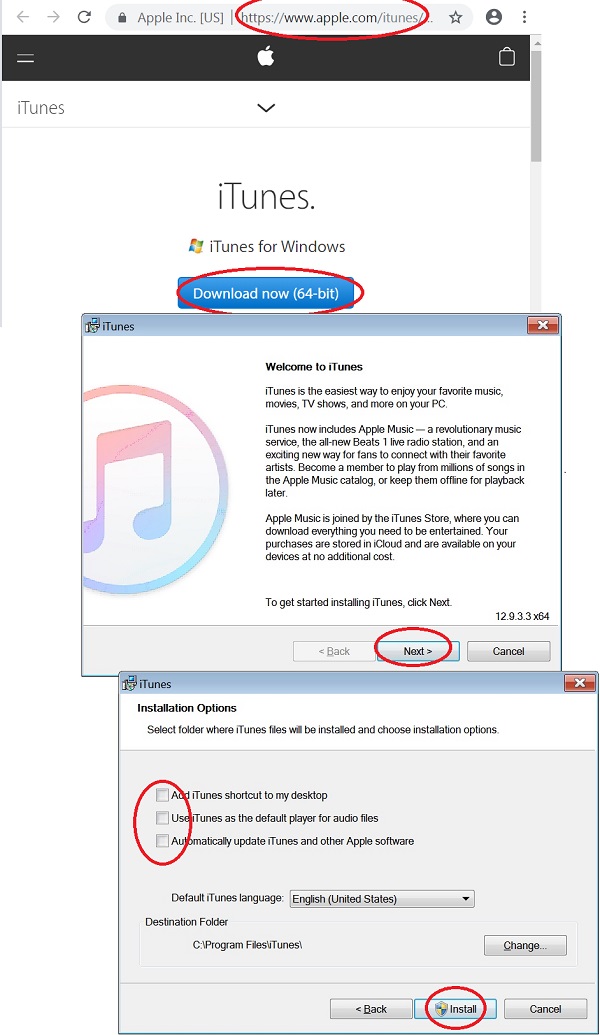
2. Run a Web browser and go to iTunes for Windows Web site at apple.com/itunes/download.
3. Click the "Download now (64-bit)" button below "iTunes for Windows".
4. Save the download file to C:\fyicenter\iTunes64Setup.exe
5. Wait for the download to finish. It may take some time, since the file is about 256 MB.
6. Double-click C:\fyicenter\iTunes64Setup.exe to start installation. You see the installation wizard displayed.
7. Click "Next" to continue. You see the "Installation Options" screen.
8. Uncheck the following options:
[ ] Add iTunes shortcut to my desktop
[ ] Use iTunes as the default player for audio files
[ ] Automatically update iTunes and other Apple software
9. Click "Install" to continue. You see the installation status screen.
10. Wait for the installation to finish. Then click "Finish" to close the installation wizard.
iTunes is ready to use on your Windows computer.
⇒ Start iTunes for Windows First Time
⇐ Install and Upgrade iTunes on Windows
2020-12-22, ∼3045🔥, 0💬
Related Topics:


