Create Contact from Phone Call History on iPhone
How to create a contact from a phone number in the phone call history on my iPhone? I just received a call from a new friend and I want to store his phone number in the contact directory.
✍: FYIcenter.com
 Here are the correct steps to create a new contact from a phone number
in the phone call history on your iPhone.
Here are the correct steps to create a new contact from a phone number
in the phone call history on your iPhone.
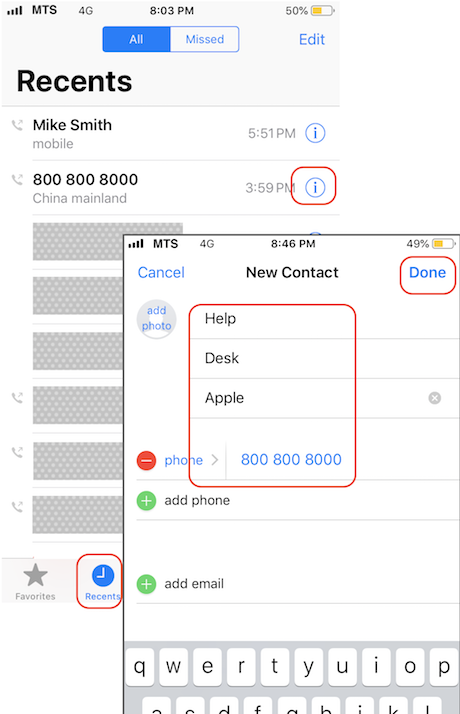
1. Open the Phone app: "Home > Phone". You see "Recents" option listed at the bottom.
2. Tap on "Recents". You see phone numbers from the phone call history.
3. Tap on the "info" sign next to the phone number your want to create a new contact. You see details of that phone call with more action options.
4. Tap on "Create New Contact" option. You see the new contact empty form with the phone number filled in.
5. Enter the contact name and company. And tap on "Done" to save it.
Now a new contact is created with that phone number.
The picture below shows you how to create a new contact from a phone number in the phone call history on your iPhone:
⇒ Update Phone Contacts on iPhone
2020-04-30, ∼2813🔥, 0💬
Related Topics:

