AirDrop Photo/Video Out Off iPhone
How to AirDrop photos and videos out off my iPhone to my friends? They are using iPhones too.
✍: FYIcenter.com
 Here are the correct steps to send pictures and videos in Photos app
from your iPhone to your friends iPhone and Apple devices.
Here are the correct steps to send pictures and videos in Photos app
from your iPhone to your friends iPhone and Apple devices.
1. Turn on AirDrop on your iPhone, in "Setting > General > AirDrop".
2. Ask your friends to turn on AirDrop on their iPhones or iPads, and select the "Everyone" option on their devices.
3. Move your iPhone closer to your friends. And ask your friends to keep their device open, not locked.
4. Go to "Photos" app and open the picture or video you want to send. You see the share button at the bottom.
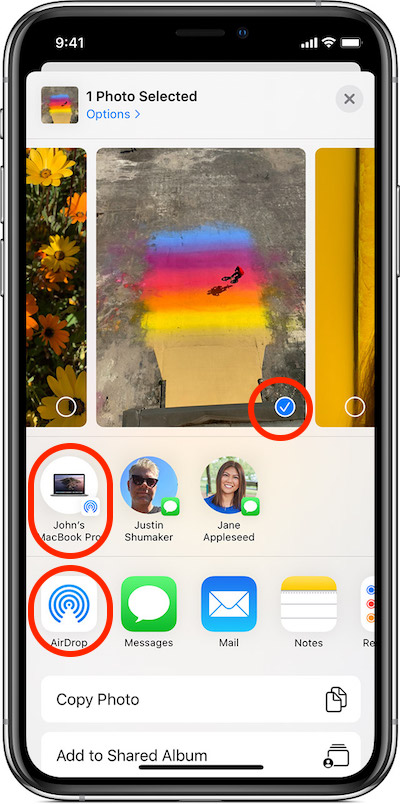
5. Tap on the share button. You see the photo became selected. Devices of your friends should be listed in AirDrop area. If not listed, verify that device is unlocked and AirDrop is turned on.
6. Tap on the devices your want to send the picture. The "Waiting" status is displayed under the device name.
7. Ask your friends to accept the incoming file. Alerts of incoming files should be displayed on their devices.
8. Verify the transfer status on your iPhone. You should see "Sent" status displayed.
Now your friends should be able enjoy your nice picture.
The picture below shows you how to AirDrop photo/video from your iPhone to your friends.
⇒ Receive AirDrop Photo/Video on macOS
⇐ Turn On/Off AirDrop on macOS
2020-05-15, ∼2929🔥, 0💬
Related Topics:

