Edit and Delete Photo Albums on iPhone
How to edit or delete photo albums on my iPhone?
✍: FYIcenter.com
 You can edit or delete photo albums on my iPhone
using these steps:
You can edit or delete photo albums on my iPhone
using these steps:
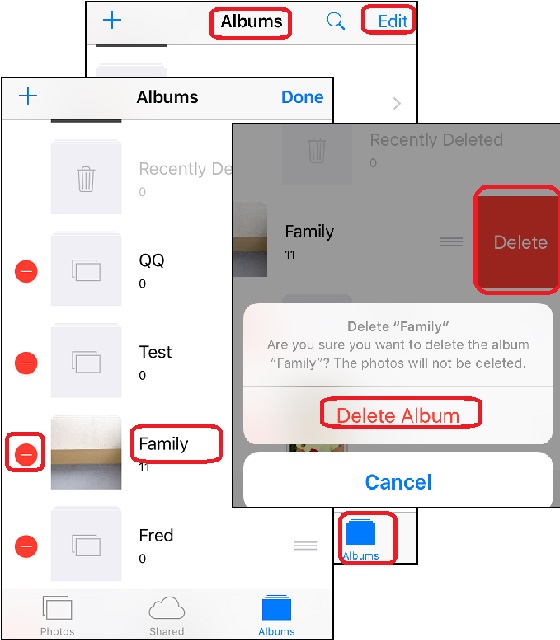
1. Open Photos app and tap on "Albums" near the bottom of the screen. You see your photos listed in different albums.
2. Tap on "Edit" near the top right corner of the screen. You see photo albums listed in edit mode.
3. Tap on the album name to modify the name.
3. Tap on "-" sign next to the album. You see the "Delete" button displayed.
4. Tap on "Delete" button. You see a confirmation message: "Are you sure you want to delete the album "Test"? The photos will not be deleted."
5. Tap on "Delete Album" to confirm. The selected album will be deleted.
6. Tap on "Done" near the top right corner of the screen to get out of the edit mode.
Note that photos and videos in that deleted album will stay in the photo collection on iPhone.
The picture below shows you how to delete an album in Photos app
on your iPhone:
⇒ Checking Storage Usage of Photos and Videos on iPhone
2017-08-13, ∼2779🔥, 0💬

