Checking Storage Usage of Photos and Videos on iPhone
How to check storage usage of photos and videos on my iPhone? I think I have too many photos and videos on my iPhone.
✍: FYIcenter.com
 You can check storage usage of photos and videos on your iPhone
using these steps:
You can check storage usage of photos and videos on your iPhone
using these steps:
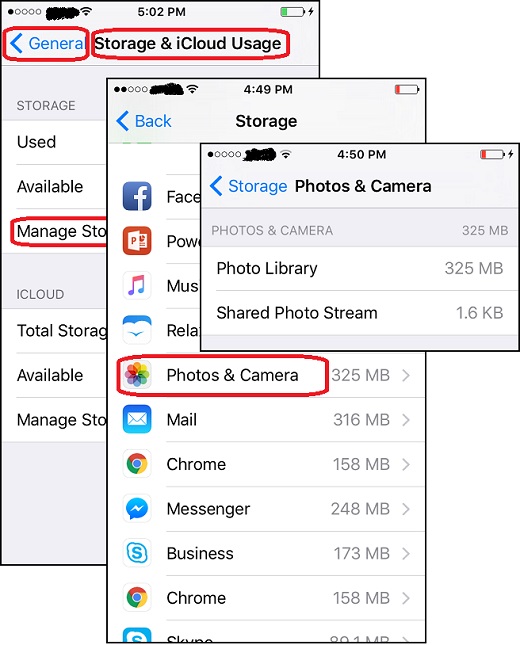
1. Tap on "Settings > General > Storage & iCloud Usage". You see the storage usage numbers for your iPhone and iCloud. For example:
STORAGE (iPhone)
   Used            11.0 GB
   Available        1.4 GB

ICLOUD
   Total Storage    5.0 GB
   Available        3.5 GB
2. Tap on "Manage Storage" in the iPhone section. You see a list of storage usages of different apps. For example:
iOS 10.3.1         1.5 GB
Facebook           539 MB
Music              357 MB
Photos & Camera    326 MB
Mail               316 MB
...
3. Tap on "Photos & Camera" in the iPhone section. You see a break down of storage usage of photo library and shared photo stream.
Now you know how much storage is used by your photos and videos. Can you go to the Photos app to delete some photos and videos to free up some storage.
The picture below shows you how to check storage usage of photos and videos
on your iPhone:
⇒ Editing Photos with iPhone Photos App
2017-07-03, ∼3161🔥, 0💬
