Taking Video with iPhone Camera
Where to take video with my iPhone camera?
✍: FYIcenter.com
 You can take video with your iPhone camera by following these steps:
1. Mount your iPhone a tripod or hold it still and open the camera.
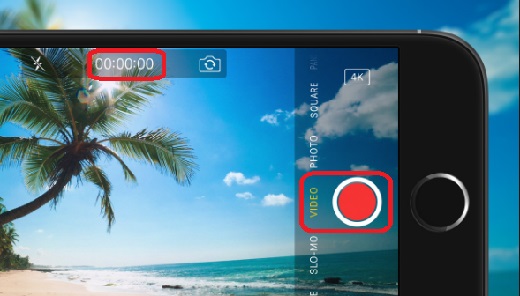
2. Swipe the camera mode selections above the shutter icon and select "VIDEO". You see the recording timer displayed on top of the screen.
3. Focus the camera. Press the center of the screen until the AE/AF Lock indicator shows up.
4. Press the shutter icon. The camera starts to record.
5. Press the shutter icon again to stop recording when you have recorded enough time.
6. Your video will be created automatically.
The picture below shows you how to take video with your iPhone (source: tekrevue.com):
⇒ iPhone Camera Video Recording Resolutions
⇐ Taking Video with iPhone Camera
2017-06-23, ∼4772🔥, 0💬
Related Topics:

