Using iCloud Keynote with Web Browsers
Q
How to use Keynote on iCloud.com with a Web browser?
✍: FYIcenter.com
A
 You can use Keynote on iCloud.com with a Web browser
by following these steps:
You can use Keynote on iCloud.com with a Web browser
by following these steps:
1. Login to https://www.icloud.com with a Web browser.
2. Click the "Keynote" box. If this is your first using Keynote and see the Keynote welcome screen, click the "Use Keynote" link. You see a list of your old presentations.
3. Click the plus sign (+) box to create a new presentation or click any presentation icon to edit any exiting presentations.
The picture below shows you how to use iCloud Keynote with a Web browser:
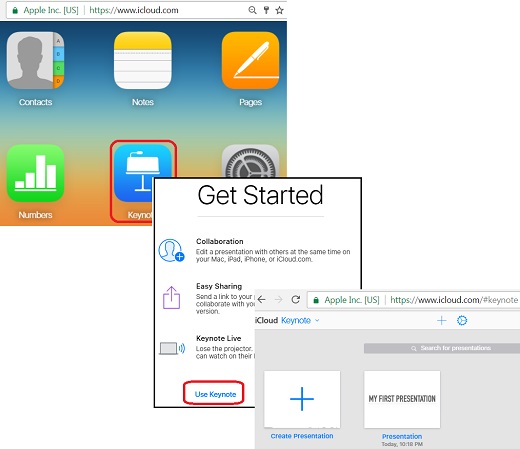
⇒ Create New Keynote Presentation Document on iCloud.com
2017-08-03, ∼5048🔥, 0💬
Related Topics: