Adding Music to iTunes Library
How to add more music files to my iTunes library? I have some favorite music files on my Windows computer and I want to listen them with iTunes.
✍: FYIcenter.com
Adding more music files to your iTunes library on Windows is easy:
1. Run iTunes on your computer.
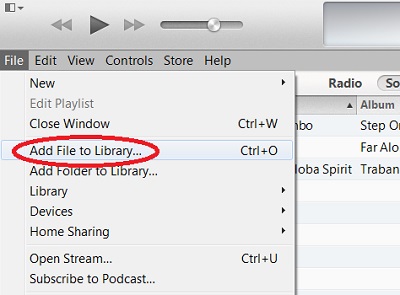
2. Click "File > Add File to Library..." menu. You see the "Add To Library" file selection screen.
2. Click Songs tab. You see the list of music items you currently have in your library.
3. Locate the folder and the music file you want to add. Then click "Open" button to finish adding the file.
The new music item should show up in the iTunes library.
You can also add all music files in a folder to iTunes library by using the "File > Add Folder to Library..." menu.
The picture below shows you the "Add File to Library..." menu in iTunes:
2014-06-18, ∼3440🔥, 0💬
Related Topics: