Proximity/Light Sensor on Samsung Phone
What is the function of the Proximity/Light sensor do on my Samsung phone?
✍: FYIcenter.com
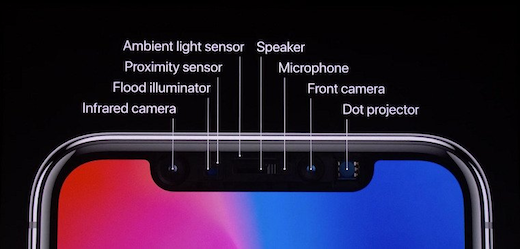
 The Proximity/Light sensor is located to the right of the ear speaker
near the top edge of the front on your Samsung phone.
The Proximity/Light sensor is located to the right of the ear speaker
near the top edge of the front on your Samsung phone.
The main function of the Proximity/Light sensor is to Turn off screen, when the phone is in close proximity to the human body. It will turn the screen on, when the phone is outside a specific range to the human body.
For example, you may put your phone on your ear during a phone call. If the phone is too close to your face, it will turn off the screen to prevent accidental keypad presses by your face.
⇒ Home Screen on Samsung Galaxy Phone
⇐ Buttons/Ports/Sensors on Samsung Phone
2023-03-07, ∼2328🔥, 0💬
Related Topics:


