Print Message as PDF in Samsung "Email"
How to print email messages in Samsung "Email" as PDF files?
✍: FYIcenter.com
 If you want to save an important email message with embedded images,
you can print it as as a PDF file by following these steps.
If you want to save an important email message with embedded images,
you can print it as as a PDF file by following these steps.
1. Tap on "Mail" app to open it. You see a list of email messages from existing email accounts.
2. Tap on the email message that you want to save. You see the message content of the email.
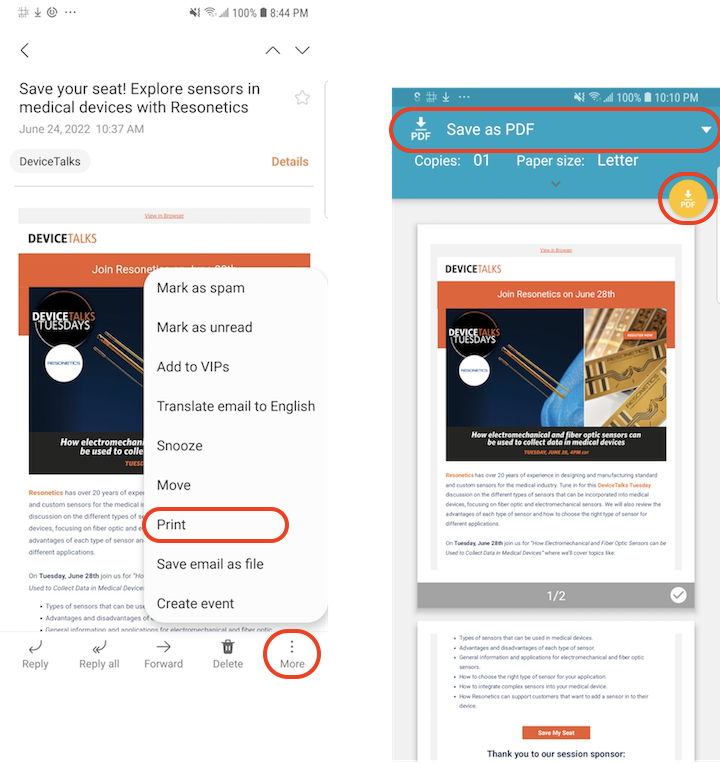
3. Tap on menu icon near the bottom right corner. You see menu items for managing this email.
4. Tap "Print" in the menu. You see the print settings screen.
5. Select "Save as PDF" from the printer dropdown list. You see the PDF download icon displayed.
5. Tap PDF download icon. You see a file folder selection screen.
6. Select the folder where you want to save the PDF file.
7. Tap on "DONE" to finish generating the PDF file.
⇒ Account Settings in Samsung "Email"
2022-06-26, ∼2216🔥, 0💬
Related Topics:


