Save Message as File in Samsung "Email"
How to save email messages in Samsung "Email" as files?
✍: FYIcenter.com
 If you have an important email message received in Samsung "Email"
app, you may want to save it as file by following these steps.
If you have an important email message received in Samsung "Email"
app, you may want to save it as file by following these steps.
1. Tap on "Mail" app to open it. You see a list of email messages from existing email accounts.
2. Tap on the email message that you want to save. You see the message text of the email.
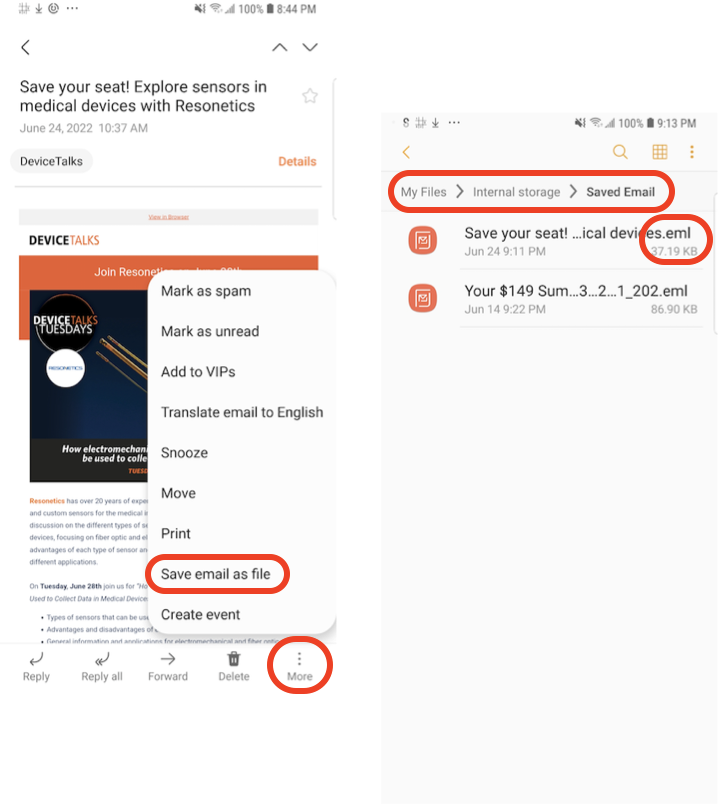
3. Tap on menu icon near the bottom right corner. You see menu items for managing this email.
4. Tap "Save email as file" in the menu. You see the file name sugguestion box.
5. Keep the suggested file name. Samsung "Email" will save in the "Saved Email" folder in "Internal storage" on your phone.
6. Go to apps screen, open "My Files", and open "Internal storage > Saved Email" folder. You see the email message is saved a file with ".eml" file name extension.
7. You can open it later with Samsung "Email", or Web browsers.
Note that images embedded in emails and attachments will not be saved into the email file.
If you want to save everything, you can save attachments separately first. Then print the email message with images into a PDF file as shown in the next tutorial.
⇒ Print Message as PDF in Samsung "Email"
2022-06-26, ∼9000🔥, 0💬
Related Topics:

