Samsung Galaxy Set Up - Language and Accessibility
How to set Up a Samsung Galaxy - Language and Accessibility?
✍: Guest
 Language Settings
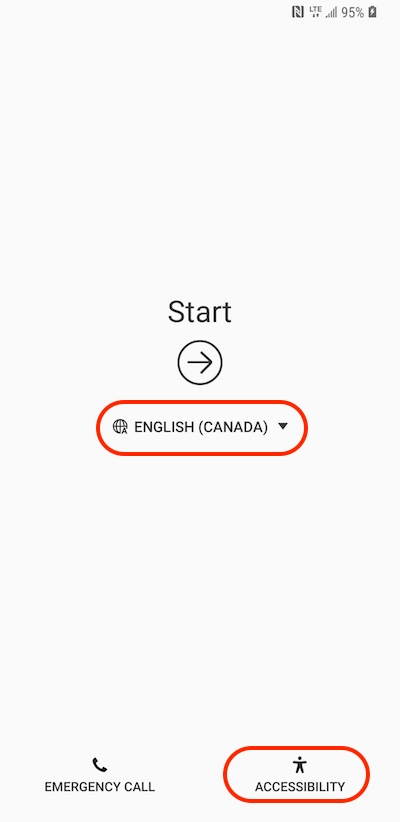
The first thing you need to do is select the language for the phone. This will change the labels, menus, help screens and other phone text into the language of your choice. Tap the drop down menu and select the language, for example, ENGLISH (CANADA).
Accessibility Settings
If you are visually impaired or hard of hearing, you can change the accessibility settings on the first screen of the set up process. Tap the button and you will be taken to the accessibility settings before going any further with the setup. Tap Start/Next to continue when finished.
⇒ Samsung Galaxy Set Up - Wi-Fi and Time Zone
2013-06-22, ∼5977🔥, 0💬
Related Topics: