Enable AirPrint on Printers
How to enable AirPrint on Printers?
✍: FYIcenter.com
 Most printers today support the AirPrint feature.
But the AirPrint feature is usually turned off by default.
Most printers today support the AirPrint feature.
But the AirPrint feature is usually turned off by default.
To turn on and enable the AirPrint feature, you need to follow the print manually, change the printer settings from the printer panel, or the printer's Web portal.
For example, if you have a Canon printer on the WiFi network with an IP address of 192.168.0.111, you can follow this tutorial to enable the AirPrint feature.
1. Connect your computer to the same network, and open http://192.168.0.111 in a Web browser. You see the printer Web portal login page.
2. Log in as an administrator and click "Settingns". You see a list of setting categories.
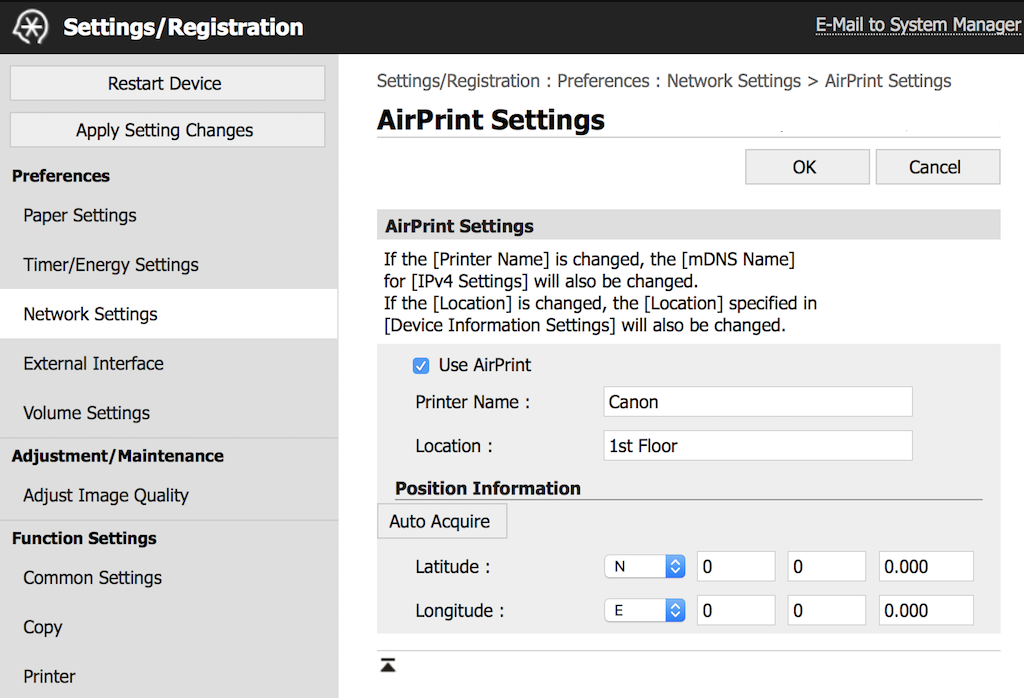
3. Click to open "Network Settings > AirPrint Settings".
4. Click to enable "[x] Use AirPrint" setting.
5. Click OK to save changes. Your printer it ready to AirPrint now.
2021-04-21, ∼2540🔥, 0💬


