Siri Voice Commands on Apple AirPods
How to use Siri voice commands on my Apple AirPods?
✍: FYIcenter.com
 You can follow this tutorial to setup and use Siri voice commands on your Apple AirPods
with your iPhone.
You can follow this tutorial to setup and use Siri voice commands on your Apple AirPods
with your iPhone.
1. Put AirPods in your ears and reconnect them with your iPhone as shown in the last tutorial.
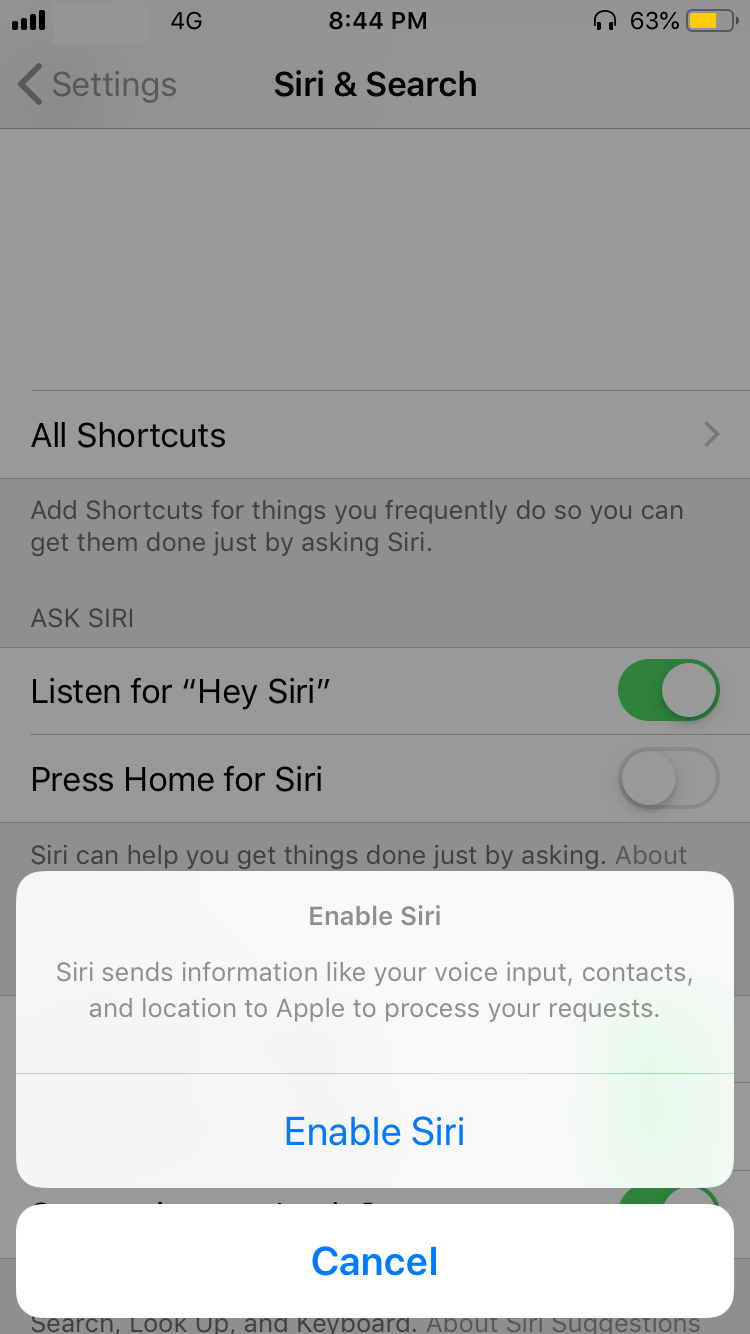
2. Tap on "Settings > Siri & Search" on you iPhone. You see a list of "Siri" settings.
3. Turn on "Listen to 'Hey Siri'". You see a warning message:
Siri sends information like your voice input, contacts,
and location to Apple to process your requests.

[Enable Siri]   [Cancel]
4. Tap on "Enable Siri". You will be prompted to say few commands to train Siri with your voice.
5. Finish the train until you see the "'Hey Siri' Is Ready" screen.
6. Say "Hey Siri" with your AirPods in ears. Siri will be activated on your iPhone to take your voice commands.
7. Say "How is the weather". Siri will report the local weather to your.
If are you concerned with Siri taking your information to the Apple server, you can turn off "Hey Siri".
⇒ Check Battery Level on Apple AirPods
2021-02-04, ∼2633🔥, 0💬
Related Topics: