iPhone Summary Displayed on iTunes on Mac
Q
How to see summary information of my iPhone is displayed on iTunes on Mac?
✍: FYIcenter.com
A
 You can following this tutorial to see summary information
your iPhone from iTunes.
You can following this tutorial to see summary information
your iPhone from iTunes.
1. Connect your iPhone to iTunes as shown in the previous tutorial.
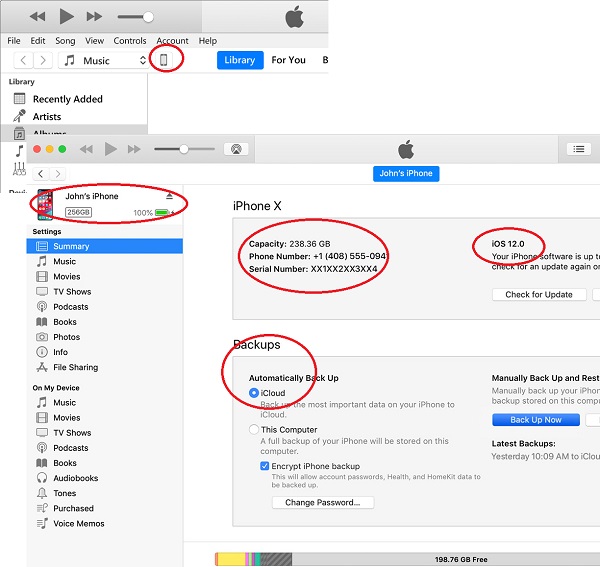
2. Click on the smart phone icon in the menu area. You see the following summary information about your iPhone.
Phone name: John's iPhone
Phone model: iPhone X

Storage: 238.36 GB
Phone number:
Serial number:

iOS version: iOS 12.0
Backups: iCloud
...
⇒ iTunes Functions on Mac to Manage iPhone
⇐ Connect iPhone to iTunes on Mac via USB
2020-11-11, ∼2960🔥, 0💬
Related Topics:
