Manage iPhone Word Documents with iTunes on Windows
How to manage iPhone Word documents with iTunes for Windows? I am using Microsoft Word app on my iPhone.
✍: FYIcenter.com
 If you are using Microsoft Word app on my iPhone,
you can use iTunes for Windows to manage Word documents on your iPhone.
If you are using Microsoft Word app on my iPhone,
you can use iTunes for Windows to manage Word documents on your iPhone.
1. Connect your iPhone to iTunes as shown in the previous tutorial.
2. Click on the smart phone icon in the menu area. You see the summary information about your iPhone.
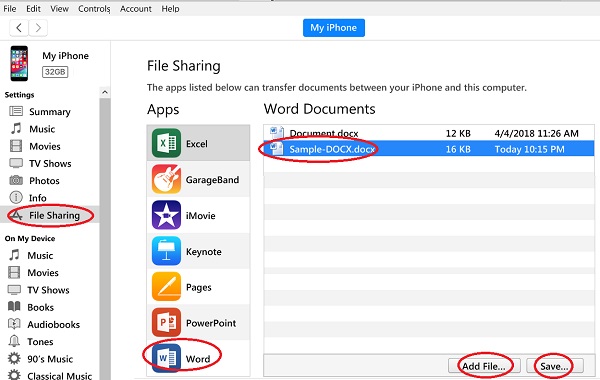
3. Click "File Sharing" in the left menu. You see a list of iPhone apps that can exchange files with your computer.
4. Click "PowerPoint" from the apps list. You see a list Word documents stored on your iPhone.
Now you can:
- Transfer a Word document from iPhone to computer by selecting the file and clicking the "Save" button.
- Transfer a Word document from computer to iPhone by clicking the "Add File" button and select a Word document.
- Rename an Word document from iPhone by double-clicking the file name and entering a new name.
- Delete a Word document from iPhone by selecting the file and pressing the "Delete" key.
⇒ Manage iPhone Music from iTunes on Windows
⇐ Manage iPhone PowerPoint Files with iTunes on Windows
2020-09-15, ∼2489🔥, 0💬
Related Topics:
